Root canals left half done
A patient misses the second sitting, and nobody notices until the tooth hurts again.
 Sign in
Ask for a demoDemo
Sign in
Ask for a demoDemo
Dentyaan
Patient records, follow-ups, reminders, lab orders and billing for small dental clinics, and a register that never forgets a follow-up. On the phones your clinic already has, in English, हिंदी and తెలుగు.
Comes with
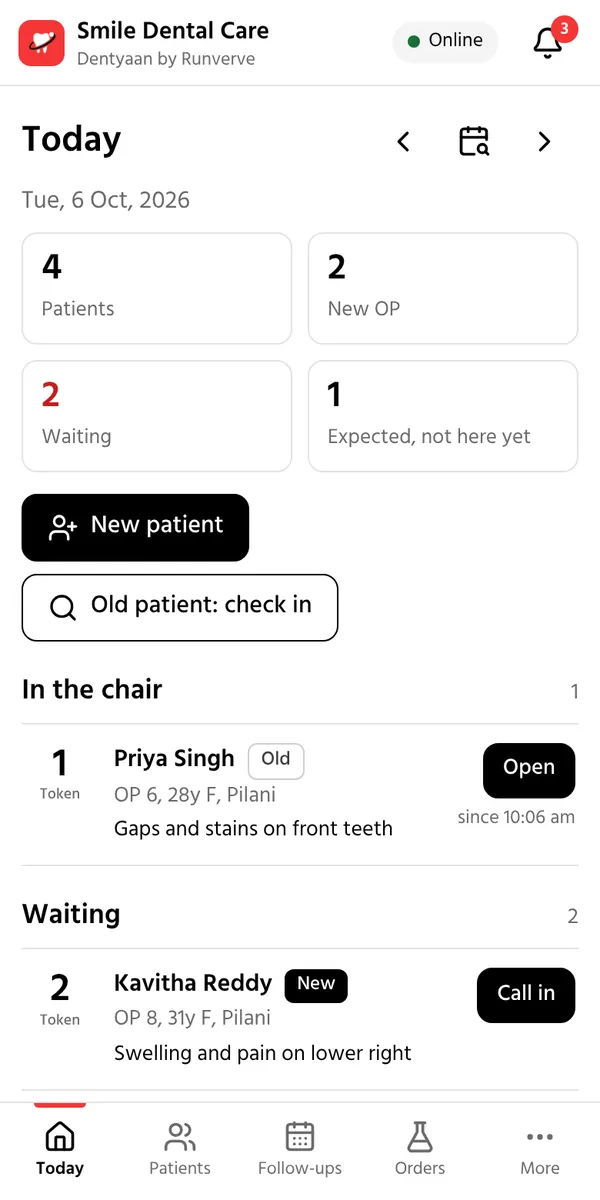
Most small clinics run on a register book, a diary and memory. It works, until a patient slips through.
A patient misses the second sitting, and nobody notices until the tooth hurts again.
Was the crown sent? Is it back? Someone has to call and ask.
When a patient comes back after two years, their last treatment is somewhere in a pile of books.
Collections, dues and lab bills add up only at the end of the month, if at all.
Dentyaan keeps all of it in one place, on the phones you already have.
Three steps, the same way your clinic already works.
The assistant adds a new patient in a few taps, or finds an old one by name, phone or OP number. Medical alerts show on every visit.
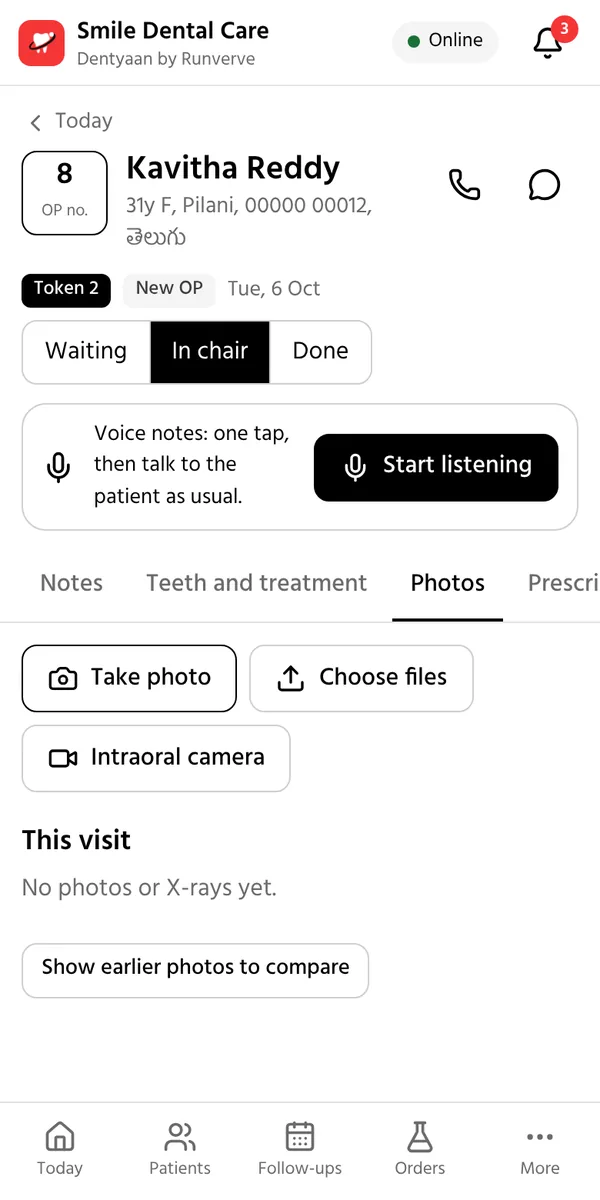
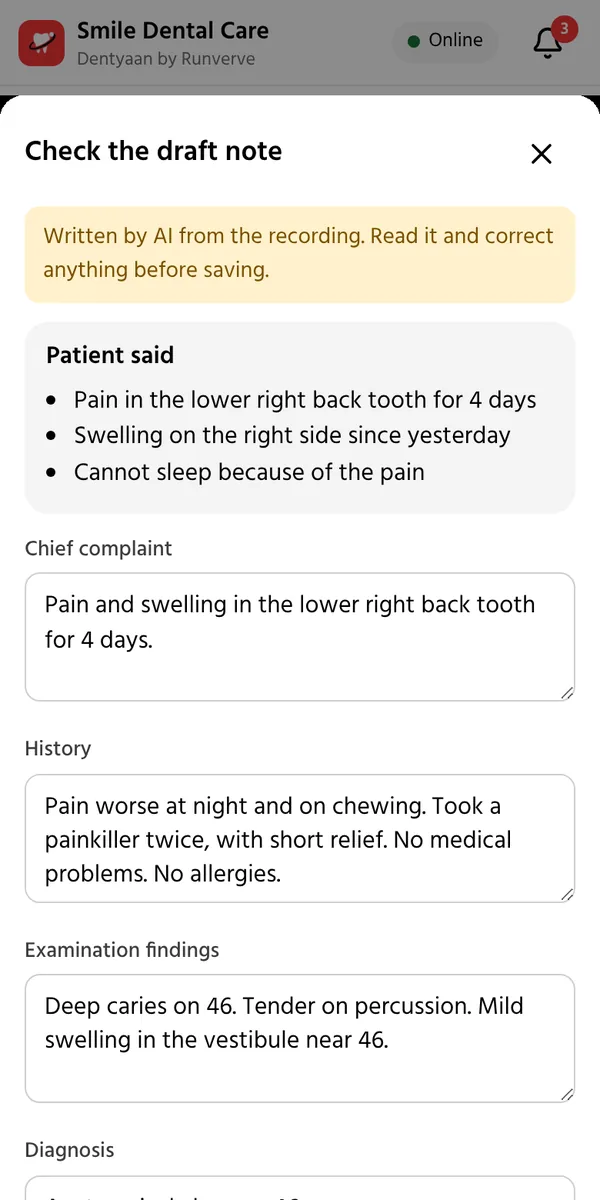
Mark the tooth chart, take photos with Dentyaan Cam and speak your notes to Dentyaan Pod. The prescription and the bill take a few taps.
The next sitting is booked by itself, and the patient gets a reminder in their own language. Missed visits come back on the morning call list.
In the chair
Dentyaan comes with its own intraoral camera and mic. Your hands stay on the patient while the record fills up.
Our intraoral camera


Patients see their own teeth on the screen: the cavity, the crack, the worn filling. A photo explains in seconds what takes minutes to describe, and before and after photos show the work you did.
Our mic for voice notes

Wear the Pod, or set it on the dental table. It connects to the clinic phone over Bluetooth, so nobody holds a phone through the visit. Talk to the patient as you always do, in Telugu, Hindi, English or a mix. Dentyaan writes the chief complaint, history, findings, diagnosis, procedure done and advice. Medicines you name can go straight onto the prescription.
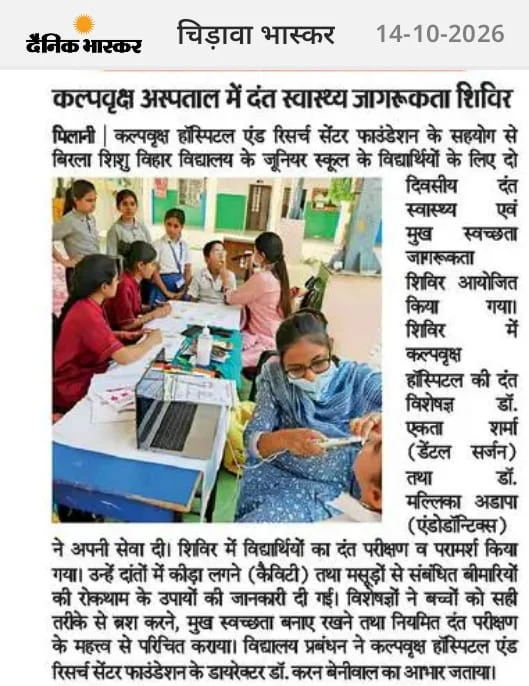
In the news
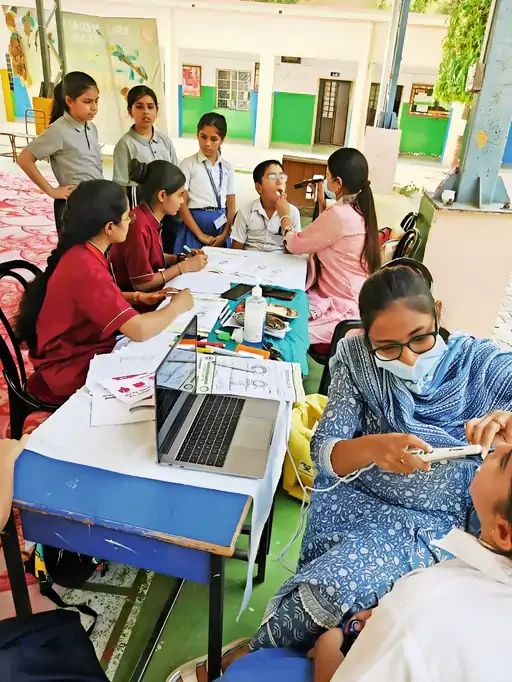
Covered by Dainik Bhaskar, Chirawa edition, 14 October 2026
Dr. Mallika screened the children with the Dentyaan Cam on a laptop. Each child saw their own teeth on the screen, so a cavity was something they could see, not just a word.
Dentyaan replaces the register book, the appointment diary, the lab notebook and the cash book.
Every treatment that needs more than one visit books its next sitting by itself. Missed visits come back on the next morning's call list.
Visits, teeth, X-rays, prescriptions and bills in one place, found by name, phone or OP number. No more turning the pages of old registers.
Printed on your letterhead, with allergies and pregnancy flagged while you write. Patients see them on their phone too.
Every lab order, scan referral and pharmacy order has a status. Partners update it from a WhatsApp link, and you are told when work is ready.
What was billed, collected and is still due, by day, doctor and procedure, with cash, UPI and card in one place.
Reminders and prescriptions in their own language, and their full dental record on their own phone.
A full visit in under three minutes, at AB's Multi-speciality Dental Clinic, Kakinada.
Built around the way a small clinic already works: the register, the token and the case sheet.
Register a patient in a few taps, with the same columns as your register book. Their medical history is noted once; diabetes, BP, blood thinners, pregnancy and allergies then show as alerts on every visit. Each patient gets a token, and everyone sees who is waiting, in the chair or done.
Mark the tooth chart with FDI numbers, or type it the way you write the register: 36 RCT, 46 EXT. Speak the notes to the Dentyaan Pod instead of typing them. Prescriptions take a few taps, with allergies and pregnancy flagged while you write. Photos from the Dentyaan Cam or the phone, RVG, OPG and CBCT go into the same record, before and after.
The bill is made from the treatments already entered. Take cash, UPI or card, or part of it, and the rest shows as due. Send the receipt on WhatsApp in the patient's language. Materials used come out of stock by themselves.
The assistant opens one list of calls: today's patients, reminders for the next working day, lab work that is back, and missed visits. One tap calls the patient, or opens WhatsApp with the message ready in their language.
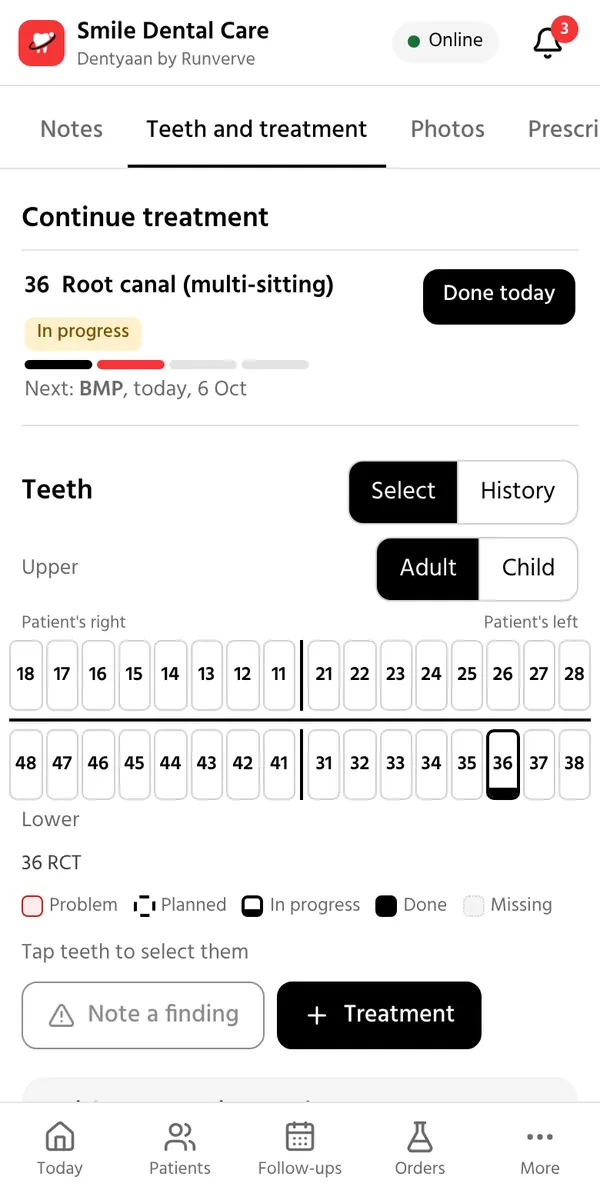
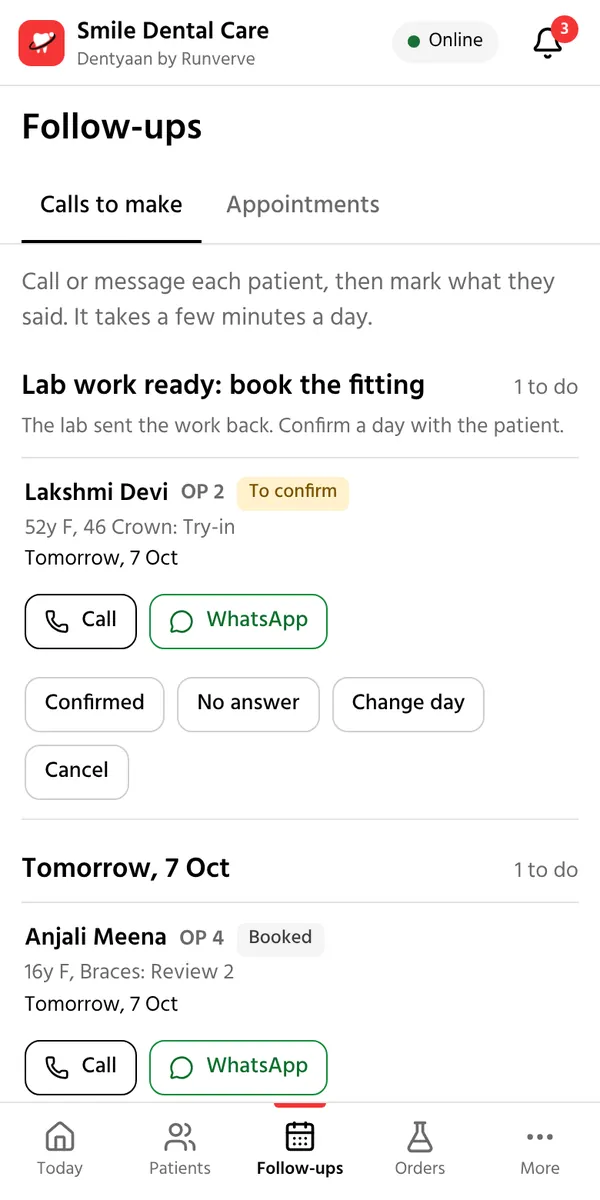
The same clinic day, side by side.
| Task | Paper register | Dentyaan |
|---|---|---|
| Finding an old patient | Turning the pages of old books | By name, phone or OP number, in seconds |
| The next sitting | Written on a card, easy to miss | Booked by itself, with a reminder |
| Lab work | Calls to ask if it is ready | Tracked, and you are told when it is back |
| Prescriptions | Handwritten | Printed on your letterhead, sent on WhatsApp |
| Money | Added up at the end of the month | Billed, collected and due, every day |
| X-rays and photos | In drawers and on phones | In the patient's record |
| If the book is lost | The history is gone | Backed up every night in India |
| The patient's copy | None | Their record on their own phone |
When a sitting is done, the next one is booked by itself. The treating doctor can change any date.
Send an order in a couple of taps. The lab, scan centre or pharmacy gets it on WhatsApp with a link and updates it from there, with no app and no login.
After each visit, one tap sends the patient a WhatsApp message in their language with what was done, the next visit and a link to their record.
Each day's patients in register order, with new and old OP counted. Download any period as an Excel file for your accounts.
These start switched off, so the app stays simple on day one. The clinic owner turns any of them on in Settings.
Every clinic is different. Tell us about yours, and we will send you a price that fits it.
Starter
The whole record, on the phones you already have.
Plus, with the devices
Everything, with our camera and mic in your clinic.
Or buy the devices
Dentyaan Cam and Dentyaan Pod, yours to keep.
Patient data kept in India and backed up every night. Starting with clinics in Andhra Pradesh, Telangana, Rajasthan and Delhi. Questions first? WhatsApp us.
Get the app
Older Mac with an Intel chip? Get this Mac app. On a Mac, the first time you open it: System Settings, Privacy & Security, Open Anyway.
Or use it in any browser, nothing to install: dentyaan.com/app
About Dentyaan
Give every small dental clinic in India the tools of a big hospital, on the phones it already has, so patients get safe, complete and affordable care close to home.
An India where good dental care reaches every town, and no one has to travel to a big city for it.

BDS, FIE (Endodontics), MHA
Co-founder & Chief Medical Officer
A dental surgeon and the founder of AB's Multi-speciality Dental Clinic, with earlier work at Apollo Hospitals. She leads the clinical side of Dentyaan.
LinkedIn
B.Tech (CSE), DFT
Co-founder & Chief Marketing Officer
An engineer turned storyteller, with years of experience in content and communication. He leads Dentyaan's brand, marketing and outreach to clinics.
LinkedIn
B.E. (Hons) EE, MBA (Finance & Strategy)
Co-founder & Chief Technology Officer
An engineer from BITS Pilani, with earlier years at Samsung R&D and AMD. He leads the product and the team that builds Dentyaan.
LinkedInIt depends on your clinic: how many doctors you have, whether you want the Dentyaan Cam and Pod, and how much you use voice notes. There are three ways to start. Starter gives you every feature on the phones you already have. Plus adds the Dentyaan Cam and Dentyaan Pod on rent. Or stay on Starter and buy the devices to keep. Ask for a demo or message us on WhatsApp, and we will send you a price that fits your clinic.
No. Dentyaan keeps working when the internet drops and sends your changes once the connection is back. You need the internet to sign in the first time, and to open a screen you have never opened on that phone.
It is stored in Google Cloud in Mumbai, India, and backed up every night. Photos and X-rays are never on an open link. Each person has their own login and sees only what their role needs, and every important change records who made it and when.
Any Android phone, iPhone, tablet or computer. Use it in the browser (Chrome works best) and add it to the home screen, or download the Dentyaan app for Windows, Mac or Android from this page.
No. The phone's own camera and mic work with the same record, and so does a USB intraoral camera you already have. Take the Cam and Pod on rent with the Plus plan, or buy them, when you want them.
Yes. Each phone can be set to English, Hindi or Telugu, and patients get their messages in their own language.
We set up your clinic and show your team on their own phones. Extra tools start switched off, so day one stays simple: register, treat, bill and remind.
Yes. Photograph old case sheets or register pages and Dentyaan reads them into patients for you to check, or bring in your patient list from Excel. Old patients can also be added as they come back.
Yes. One login works across clinics, and each clinic's patients stay separate.
Yes. After a visit the patient can get a WhatsApp link to their record. It opens with the last 4 digits of their phone number and shows their visits, treatment plan, prescriptions, X-rays and bills.
It stays yours. Download the register as an Excel file and any patient's full record as a standard FHIR file at any time. When you leave, we delete your clinic's data on request.
Message or call us on +91 79765 46258, write to info@dentyaan.com, or use Report a problem inside the app.
Something else? Ask us on WhatsApp.
Tell us a little about your clinic. We will call or WhatsApp you to fix a time, and show you Dentyaan on your own phone.
We use these details only to contact you about Dentyaan.