Sign in Ask for a demo

Dentyaan by Runverve

The register that never forgets a follow-up.

Patient records, follow-ups, reminders, lab orders and billing for small dental clinics. On the phones your clinic already has, in English, हिंदी and తెలుగు.

Comes with

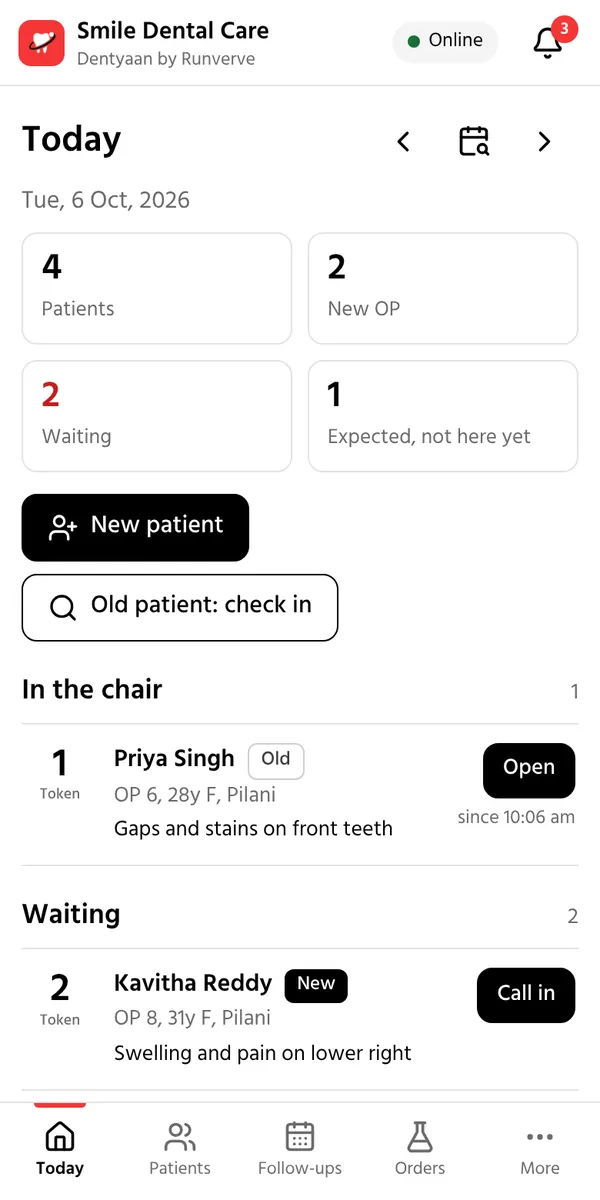
Dentyaan on a phone: today's patients in token order, with who is waiting, in the chair and done.

In the chair

Photos and notes go straight into the record.

Dentyaan comes with its own intraoral camera and mic. Your hands stay on the patient while the record fills up.

Dentyaan Cam

Our intraoral camera

Patients see their own teeth on the screen: the cavity, the crack, the worn filling. A photo explains in seconds what takes minutes to describe, and before and after photos show the work you did.

  • Pictures go straight into the patient's record. Take several in a row, then tag the teeth and mark them before, during or after.
  • Show earlier photos beside today's to compare.
  • Already have a USB intraoral camera? It works too, and so does the phone camera, with light and zoom for close-ups.
Dentyaan Pod

Our mic for voice notes

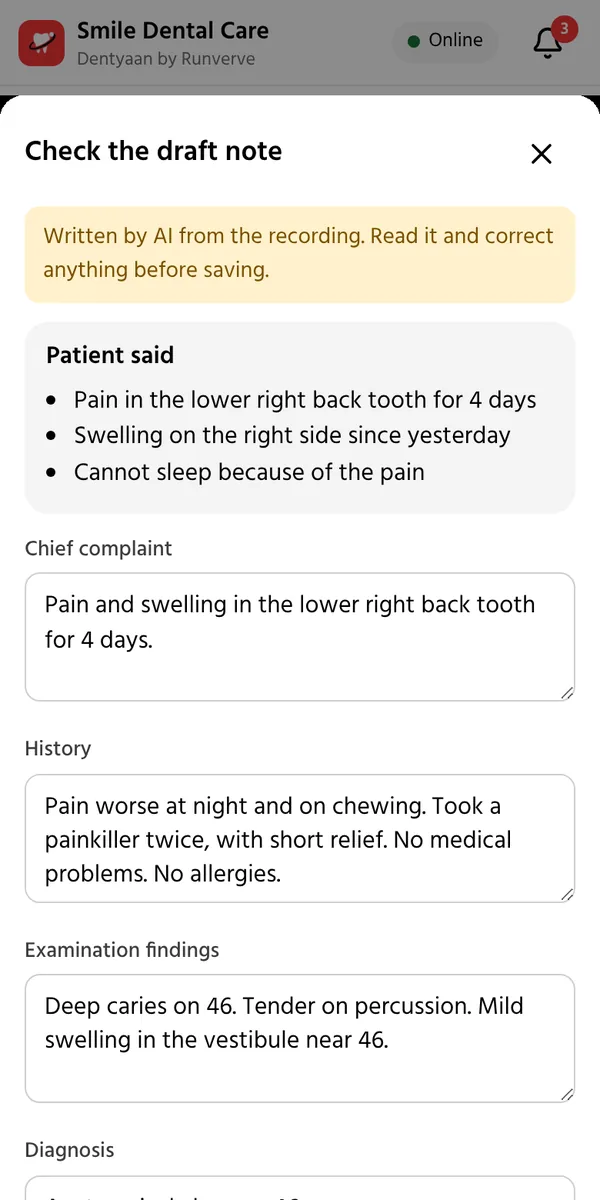
Place the Pod on the dental table. It connects to the clinic phone over Bluetooth, so nobody holds a phone through the visit. Talk to the patient as you always do, in Telugu, Hindi, English or a mix. Dentyaan writes the chief complaint, history, findings, diagnosis, procedure done and advice. Medicines you name can go straight onto the prescription.

  • The doctor reads the draft, corrects it and saves it.
  • It records only the visit you start, and only when the patient agrees. The recording is deleted once the note is saved, unless the clinic chooses to keep it.
  • No Pod at hand? The phone's own mic works too.
  • Prefer to write? Take a photo of your handwritten page, and Dentyaan reads it for you to check.
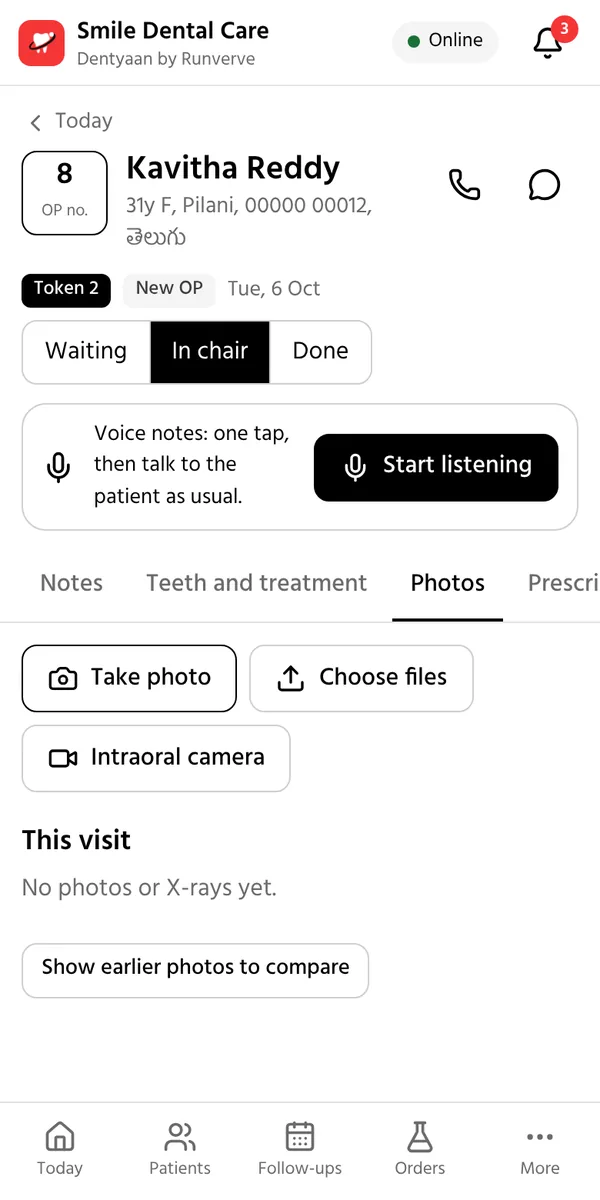
A visit in Dentyaan: a Start listening button for voice notes, and an Intraoral camera button next to Take photo.
The draft note written from the conversation: what the patient said, the chief complaint, history and findings, for the doctor to check.

What it does for your clinic

Dentyaan replaces the register book, the appointment diary, the lab notebook and the cash book.

Fewer half-done treatments

Every treatment that needs more than one visit books its next sitting by itself. Missed visits come back on the next morning's call list.

Any patient's history in seconds

Visits, teeth, X-rays, prescriptions and bills in one place, found by name, phone or OP number. No more turning the pages of old registers.

Prescriptions in a few taps

Printed on your letterhead, with allergies and pregnancy flagged while you write. Patients see them on their phone too.

Lab work that does not get lost

Every lab order, scan referral and pharmacy order has a status. Partners update it from a WhatsApp link, and you are told when work is ready.

Money you can see

What was billed, collected and is still due, by day, doctor and procedure, with cash, UPI and card in one place.

Patients who feel cared for

Reminders and prescriptions in their own language, and their full dental record on their own phone.

A day at the clinic

Built around the way a small clinic already works: the register, the token and the case sheet.

1

At the front desk

Register a patient in a few taps, with the same columns as your register book. Their medical history is noted once; diabetes, BP, blood thinners, pregnancy and allergies then show as alerts on every visit. Each patient gets a token, and everyone sees who is waiting, in the chair or done.

2

In the chair

Mark the tooth chart with FDI numbers, or type it the way you write the register: 36 RCT, 46 EXT. Speak the notes to the Dentyaan Pod instead of typing them. Prescriptions take a few taps, with allergies and pregnancy flagged while you write. Photos from the Dentyaan Cam or the phone, RVG, OPG and CBCT go into the same record, before and after.

3

At the counter

The bill is made from the treatments already entered. Take cash, UPI or card, or part of it, and the rest shows as due. Send the receipt on WhatsApp in the patient's language. Materials used come out of stock by themselves.

4

Every morning

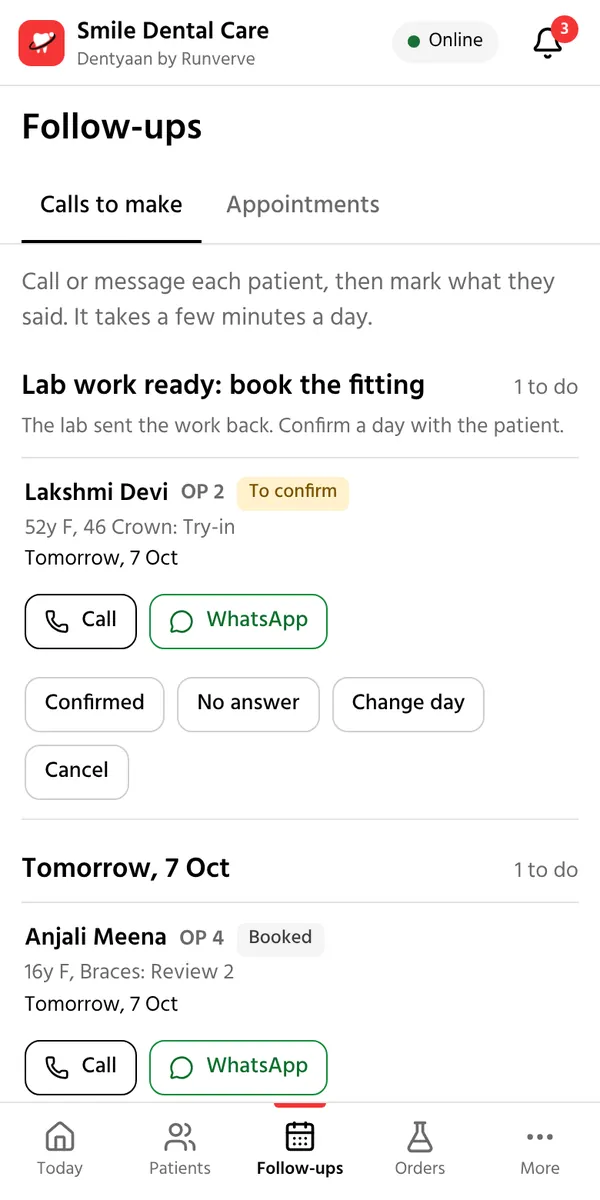
The assistant opens one list of calls: today's patients, reminders for the next working day, lab work that is back, and missed visits. One tap calls the patient, or opens WhatsApp with the message ready in their language.

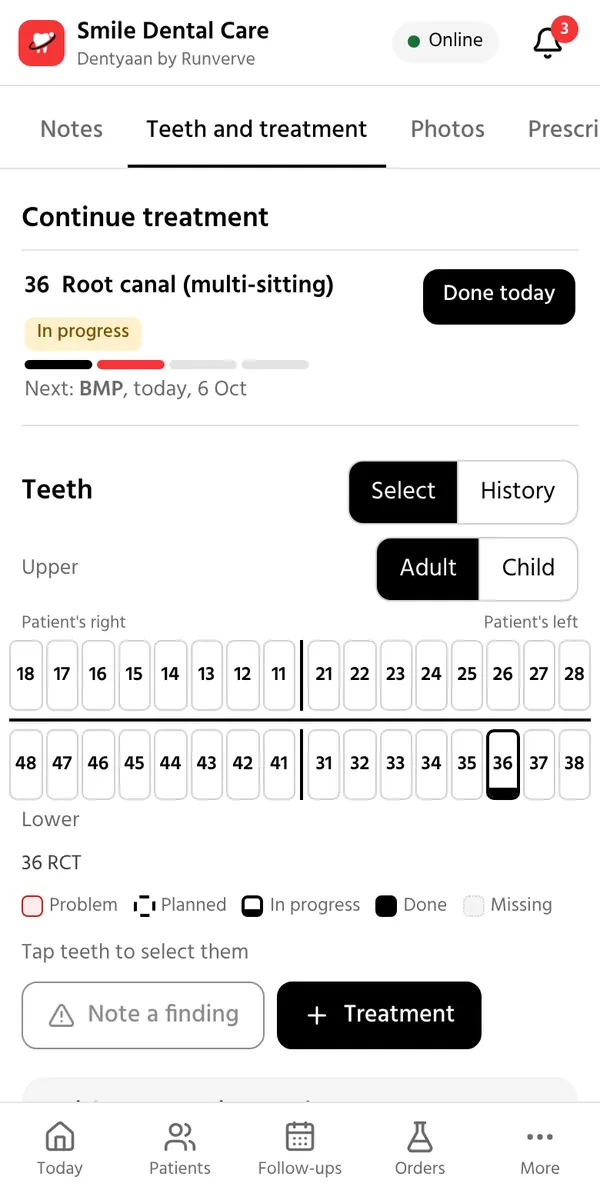
A patient's visit: the root canal on 36 is in progress, the next sitting is planned, and the tooth chart shows it.
The morning call list, with a button to call and a button to send the reminder on WhatsApp.

Follow-ups that book themselves

When a sitting is done, the next one is booked from Dr. Mallika Adapa's protocols. Closed days are skipped, and any date can be changed.

  • Root canal: BMP after 2 days, obturation 5 days later, then cementation.
  • Impaction surgery: suture removal after 7 days.
  • Crown, bridge or denture: the fitting is pencilled in as soon as the lab marks the work ready.
  • Braces: a review every month for a year.

Change the prices and visit plans of any procedure, or add your own.

Labs, scan centres and pharmacies

Send an order in a couple of taps. The lab, scan centre or pharmacy gets it on WhatsApp with a link and updates it from there, with no app and no login.

  • Lab orders with teeth, shade, material and due date, from sent to fitted.
  • Scan referrals, with the images and report back in the patient's record.
  • Prescriptions to a nearby pharmacy for pickup or home delivery.
  • Partners see only what they need for the work, nothing else from the record.

For your patients

After each visit, one tap sends the patient a WhatsApp message in their language with what was done, the next visit and a link to their record.

  • Their record opens on their phone with the last 4 digits of their number: visits, plan, prescriptions, X-rays and bills.
  • They can download a copy, ask for a correction or deletion, or stop reminders, as India's DPDP Act allows.
  • Consent for records, reminders and voice notes is recorded for each patient.

Records and numbers

Each day's patients in register order, with new and old OP counted. Download any period as an Excel file for your accounts.

  • The doctor sees today's patients, treatments not finished, lab work and notes waiting.
  • The owner sees billed and collected, dues, procedures, stock running low and follow-ups kept or missed.
  • You are told when lab work is ready or a scan centre uploads images.

More, when you want it

These start switched off, so the app stays simple on day one. The clinic owner turns any of them on in Settings.

  • Treatment estimates to print or send on WhatsApp
  • Consent forms in the patient's language, signed on the phone or on paper
  • Appointment requests from a link or a QR poster
  • Google review requests after treatment
  • Treatment explainers and care advice on WhatsApp
  • Check-up reminders every 6 months
  • Mouth cancer check for patients who use tobacco
  • X-ray help, where AI notes existing work for the doctor to check
  • Guided photo set, the standard dental photos one by one
  • Expenses and lab bills, month by month
  • Import from Excel, your existing patient list

Easy to start

  • Any phone or computer. Open the link and add it to the home screen. Nothing to install from a store.
  • Works when the internet drops. Changes are sent when the connection is back.
  • English, Hindi or Telugu, on each phone separately.
  • A role for everyone. Assistants register, bill and remind; doctors also write notes and prescriptions; owners also see the money and settings.
  • More than one clinic. A doctor who visits several clinics uses one login, and each clinic's patients stay separate.

Safe to run

  • Kept in India. Patient data is stored in Google Cloud in Mumbai.
  • Backed up every night, with backups kept for 14 days.
  • Private files. Photos, X-rays and reports are never on an open link.
  • Audit log. Every important change records who made it and when.
  • Your data stays yours. Download the register as Excel, and a patient's full record as a standard FHIR file.

Getting started

  1. We set up your clinicwith your letterhead, logo, UPI ID, procedures, prices and the labs you already use. Your Dentyaan Cam and Dentyaan Pod come with it.
  2. Add your team.Each doctor and assistant gets their own login.
  3. Put it on the clinic's phones.Open the link and add it to the home screen.
  4. Start with today's patients.Old patients go in as they come back, or all at once from Excel.

Starting with clinics in Andhra Pradesh, Telangana, Rajasthan and Delhi.

Ask for a demo

Tell us a little about your clinic. We will call or WhatsApp you to fix a time, and show you Dentyaan on your own phone.

Prefer email? Write to info@dentyaan.com.

We use these details only to contact you about Dentyaan.

Doctors in the clinic
What the clinic uses today