Root canals left half done
A patient misses the second sitting, and nobody notices until the tooth hurts again.
 Sign in
Ask for a demoDemo
Dentyaan Dental clinic software
Dental clinic software
Dentyaan runs the whole clinic on the phones you already have: the front desk, the chair, the counter, the lab, stock, reports and camps. In English, Hindi and Telugu, and it keeps working when the internet drops. It is dental practice management software built for clinics with one to five doctors.
Most small clinics run on a register book, a diary and memory. It works, until a patient slips through.
A patient misses the second sitting, and nobody notices until the tooth hurts again.
Was the crown sent? Is it back? Someone has to call and ask.
When a patient comes back after two years, their last treatment is somewhere in a pile of books.
Collections, dues and lab bills add up only at the end of the month, if at all.
Dentyaan keeps all of it in one place, on the phones you already have.
Dentyaan replaces the register book, the appointment diary, the lab notebook and the cash book.
Every treatment that needs more than one visit books its next sitting by itself. Missed visits come back on the next morning's call list.
Visits, teeth, X-rays, prescriptions and bills in one place, found by name, phone or OP number. No more turning the pages of old registers.
Printed on your letterhead, with allergies and pregnancy flagged while you write. Patients see them on their phone too.
Every lab order, scan referral and pharmacy order has a status. Partners update it from a WhatsApp link, and you are told when work is ready.
What was billed, collected and is still due, by day, doctor and procedure, with cash, UPI and card in one place.
Reminders and prescriptions in their own language, and their full dental record on their own phone.
Built around the way a small clinic already works: the register, the token and the case sheet.
Register a patient in a few taps, with the same columns as your register book. Their medical history is noted once; diabetes, BP, blood thinners, pregnancy and allergies then show as alerts on every visit. Each patient gets a token, and everyone sees who is waiting, in the chair or done.
Mark the tooth chart with FDI numbers, or type it the way you write the register: 36 RCT, 46 EXT. Speak the notes into the phone instead of typing them, and Dentyaan drafts the case sheet. Prescriptions take a few taps, with allergies and pregnancy flagged while you write. Photos from the Dentyaan Cam or the phone, RVG, OPG and CBCT go into the same record, before and after.
The bill is made from the treatments already entered. Take cash, UPI or card, or part of it, and the rest shows as due. Send the receipt on WhatsApp in the patient's language. Materials used come out of stock by themselves.
The assistant opens one list of calls: today's patients, reminders for the next working day, lab work that is back, and missed visits. One tap calls the patient, or opens WhatsApp with the message ready in their language.
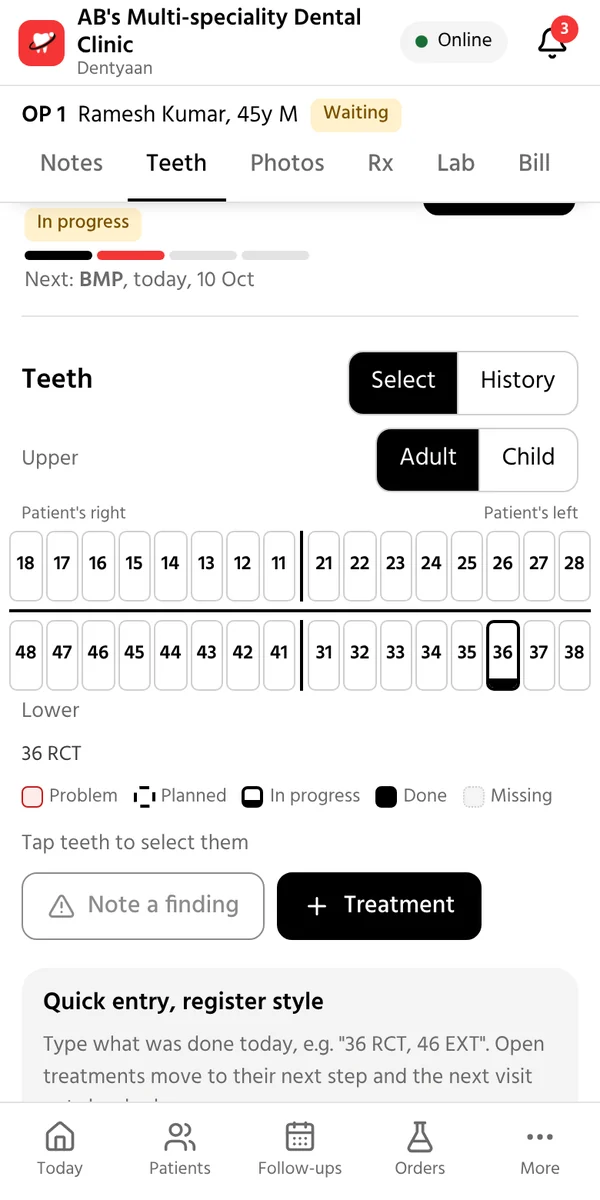
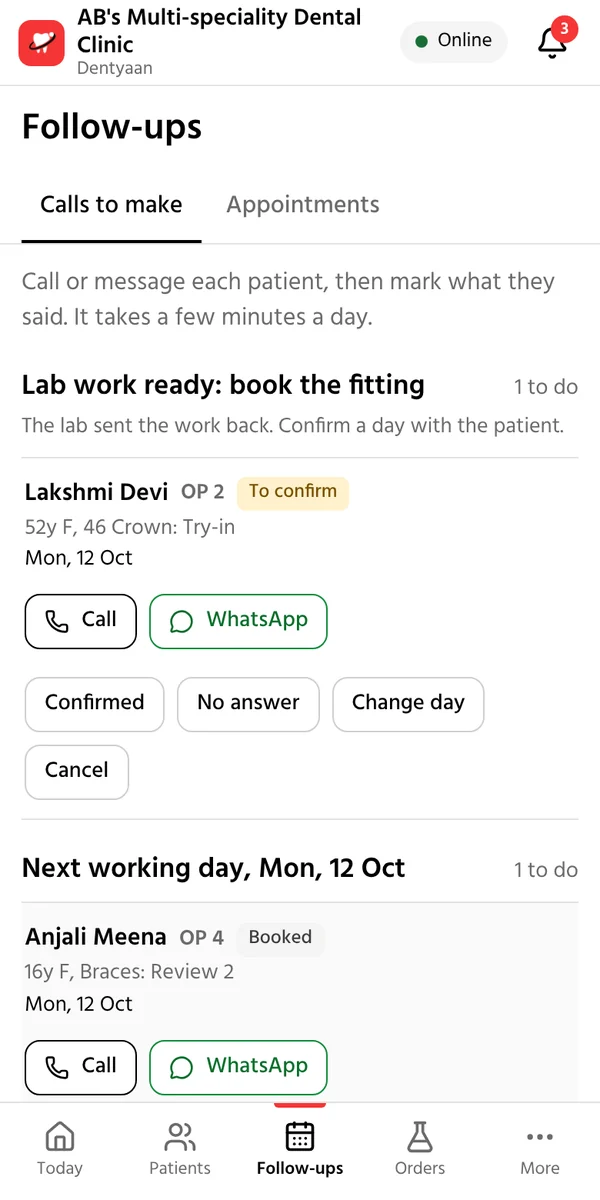
When a sitting is done, the next one is booked by itself. The treating doctor can change any date.
Send an order in a couple of taps. The lab, scan centre or pharmacy gets it on WhatsApp with a link and updates it from there, with no app and no login.
After each visit, one tap sends the patient a WhatsApp message in their language with what was done, the next visit and a link to their record.
Each day's patients in register order, with new and old OP counted. Download any period as an Excel file for your accounts.
These start switched off, so the app stays simple on day one. The clinic owner turns any of them on in Settings.
The same clinic day, side by side.
| Task | Paper register | Dentyaan |
|---|---|---|
| Finding an old patient | Turning the pages of old books | By name, phone or OP number, in seconds |
| The next sitting | Written on a card, easy to miss | Booked by itself, with a reminder |
| Lab work | Calls to ask if it is ready | Tracked, and you are told when it is back |
| Prescriptions | Handwritten | Printed on your letterhead, sent on WhatsApp |
| Money | Added up at the end of the month | Billed, collected and due, every day |
| X-rays and photos | In drawers and on phones | In the patient's record |
| If the book is lost | The history is gone | Backed up every night in India |
| The patient's copy | None | Their record on their own phone |
Whatever you choose, ask every vendor these questions. They matter most for a small clinic in India.
Read the full guide: how to choose dental clinic software in India. Moving from paper? See moving from a paper register to dental clinic software and how switching to Dentyaan works.
Get the app
Older Mac with an Intel chip? Get this Mac app. On a Mac, the first time you open it: System Settings, Privacy & Security, Open Anyway.
Or use it in any browser, nothing to install: dentyaan.com/app
It depends on your clinic: how many doctors you have, whether you want Dentyaan Cam, and how much you use voice notes. There are three ways to start. Starter gives you every feature on the phones you already have. Plus adds Dentyaan Cam on rent. Or stay on Starter and buy Dentyaan Cam to keep. Dentyaan Pod, our mic, is coming soon. Ask for a demo or message us on WhatsApp, and we will send you a price that fits your clinic.
No. Dentyaan keeps working when the internet drops and sends your changes once the connection is back. You need the internet to sign in the first time, and to open a screen you have never opened on that phone.
It is stored in Google Cloud in Mumbai, India, and backed up every night. Photos and X-rays are never on an open link. Each person has their own login and sees only what their role needs, and every important change records who made it and when.
Any Android phone, iPhone, tablet or computer. Use it in the browser (Chrome works best) and add it to the home screen, or download the Dentyaan app for Windows, Mac or Android from this page.
No. The phone's own camera and mic work with the same record, and so does a USB intraoral camera you already have. Take Dentyaan Cam on rent with the Plus plan, or buy it, when you want it. Dentyaan Pod, our mic, is coming soon.
Yes. Each phone can be set to English, Hindi or Telugu, and patients get their messages in their own language.
We set up your clinic and show your team on their own phones. Extra tools start switched off, so day one stays simple: register, treat, bill and remind.
Yes. Photograph old case sheets or register pages and Dentyaan reads them into patients for you to check, or bring in your patient list from Excel. Old patients can also be added as they come back.
Yes. One login works across clinics, and each clinic's patients stay separate.
Yes. After a visit the patient can get a WhatsApp link to their record. It opens with the last 4 digits of their phone number and shows their visits, treatment plan, prescriptions, X-rays and bills.
It stays yours. Download the register as an Excel file and any patient's full record as a standard FHIR file at any time. When you leave, we delete your clinic's data on request.
Message or call us on +91 79765 46258, write to info@dentyaan.com, or use Report a problem inside the app.
Both. Dentyaan keeps the dental record (case sheets, teeth chart, X-rays and photos) and runs the practice around it: appointments, follow-ups, billing, lab orders, stock and reports. Some people call this dental clinic management software.